Implementing infinite scroll in React is about more than just loading data—it's about transforming a static page into a dynamic, continuous feed. Content appears just in time, right as the user scrolls down. This pattern is a favorite for a reason: it creates a completely seamless and fluid browsing experience, getting rid of the abrupt stops of traditional pagination and keeping people locked into your content.
Why Infinite Scroll Still Wins for User Engagement
Infinite scroll isn't just a trendy design choice; it's a powerful tool that taps into user psychology and smart performance optimization. When people don't have to consciously click a "Next Page" button, the friction to discover more content just melts away. This creates a much more natural and continuous interaction. It’s the secret sauce behind platforms like Instagram, Pinterest, and X (formerly Twitter), which all need to serve up massive amounts of content without overwhelming their users.
The benefits go way beyond just a smooth feel. Building an infinite scroll React component brings some very real advantages to the table:
- Faster Initial Load Times: You're only loading the content needed for the initial viewport. This makes that first-page load significantly snappier compared to fetching dozens of items for an old-school paginated list.
- Increased User Engagement: The seamless flow keeps people on the page longer. It's one of the biggest motivators for developers, as this pattern has been shown to boost time spent on an app by over 30% versus pagination. If you want to dive deeper into this, LogRocket has some great insights on the topic.
- Mobile-First Friendliness: On a phone, scrolling is everything. An infinite feed feels completely intuitive and native to the mobile experience, where trying to tap tiny pagination links can be a real pain.
The Psychology of the Scroll
At its core, infinite scroll works because it plays into our natural desire for discovery. Each new piece of content that scrolls into view delivers a tiny dopamine hit, which encourages us to keep going.
Unlike pagination, which gives you a clear stopping point, the endless feed creates a "just one more" mentality. This subtle but powerful effect is a key reason why it's one of the most effective user interface design patterns for any app that's heavy on content.
Infinite scroll trades the deliberate action of clicking for the passive, almost subconscious act of scrolling. This shift reduces cognitive load and keeps the user in a state of flow, making the experience feel effortless and engaging.
But a truly great implementation involves more than just fetching data on a loop. To really nail user engagement and build interfaces that make an impact, you need to understand the broader principles of mastering digital experience design. When you grasp those fundamentals, you can ensure your infinite scroll doesn't just work—it delights.
Building Infinite Scroll with Intersection Observer
Sure, you can grab a library off the shelf, but building your own infinite scroll component from scratch gives you something invaluable: complete control. By rolling up your sleeves with React Hooks and the browser-native Intersection Observer API, you can craft a lean, high-performance solution without bloating your project with extra dependencies.
This whole approach is about being smart and efficient. Instead of hammering the browser by constantly listening for scroll events—which can really bog things down—the Intersection Observer API just tells you when a specific element pops into the viewport. It’s the perfect, low-cost trigger for fetching the next chunk of data.
This is the kind of seamless user journey we're aiming for. It's all about keeping users locked in.

This simple flow shows how ditching distinct "next page" clicks for a smooth, continuous scroll keeps people absorbed in your content.
The Sentinel Element Strategy
So, how does it work in practice? The core idea is to plant an invisible "sentinel" element at the very bottom of your list of items. This can be as simple as an empty <div> with a ref attached to it.
You then tell the Intersection Observer to keep an eye on only that sentinel.
The moment a user scrolls down and that invisible element enters their screen, the observer fires off a callback. That callback is your command center, where you'll kick off a few key actions:
- First, check if there’s actually more data left to fetch.
- Flip a loading state to
trueto show a spinner or some feedback. - Fire off the API call for the next page of results.
- Once the data arrives, append it to your existing list and turn the loading state off.
This pattern is so elegant because the browser handles all the heavy lifting of watching the viewport. Your app is free from running expensive calculations on every single scroll tick. To make things even slicker, you can pair this data-loading event with some subtle entrance animations. We actually have a great guide on how to implement CSS animation on scroll if you want to dive deeper.
Creating a Custom Hook
To keep your component logic clean and make this pattern reusable across your app, the best move is to wrap all the observer logic inside a custom React hook—something like useIntersectionObserver. This hook will neatly manage the observer instance, the reference to that sentinel element, and the callback function that triggers your data fetching.
This approach is especially powerful in the React world. Remember, React powers over 11 million live websites, dominating around 45.8% of the JavaScript library market. Its entire philosophy is built around creating modular, reusable pieces, and a custom hook for a complex UI pattern like infinite scroll is a perfect fit.
By abstracting the Intersection Observer logic into a custom hook, you create a declarative API for your components. A component simply needs to use the hook and provide a callback, without needing to know the low-level details of how the observation is managed.
The Intersection Observer API is the modern, performance-first way to handle visibility detection, making it the ideal tool for building a custom infinite scroll feature from the ground up.
Choosing the Right Library for Your Project
While building an infinite scroll from scratch is a fantastic learning experience, let's be real: production environments demand speed, reliability, and code that's easy to maintain. This is where dedicated libraries come in, handling the tricky edge cases so you don't have to. When it comes to infinite scroll in React, the choice usually boils down to two paths: a simple UI component or a powerful, full-blown data-fetching library.
Two options perfectly capture this choice: react-infinite-scroll-component and TanStack Query's useInfiniteQuery hook. They both get you to the same finish line, but they take completely different routes to get there.
The Lightweight Component: react-infinite-scroll-component
If you just need to get a simple feed up and running fast, react-infinite-scroll-component is your best friend. It’s a straightforward, no-fuss component that wraps your list and takes care of all the scroll detection logic for you.
You just hand it the essential pieces, and it does the heavy lifting:
dataLength: The current number of items you've loaded.next: The function it should call to fetch more data.hasMore: A simple boolean telling it if the party's over or if more items are available.loader: A bit of JSX to show while the next batch is on its way.
This library is perfect for simpler use cases. It's incredibly easy to drop into a project, its API is minimal, and it doesn't force you to rethink your application's entire data-fetching strategy. It focuses purely on the UI and the scroll event, leaving the state management entirely up to you.
The Data-Fetching Powerhouse: TanStack Query
On the other side of the ring, we have TanStack Query (you might know it as React Query). This isn't just an infinite scroll tool; it's a comprehensive server-state management solution. Its useInfiniteQuery hook is purpose-built for wrangling paginated data with finesse.
With useInfiniteQuery, you define how to fetch a page of data and, most importantly, how to figure out the parameters for the next page. In return, the library hands you a suite of managed states and functions that make life much easier:
data: A clean object containing all the pages you've fetched.fetchNextPage: A stable function to trigger the next data pull.hasNextPage: An intelligent boolean that knows if another page is available.isFetchingNextPage: A dedicated loading state just for subsequent fetches.
The real magic, though, is everything that happens under the hood. TanStack Query automatically handles caching, prevents duplicate requests, and intelligently refetches data in the background. This translates directly to a smoother UI, fewer network calls, and a much more resilient app.
When you choose
useInfiniteQuery, you're not just adding infinite scroll. You're adopting a robust data-fetching strategy that can manage complex server state across your entire React application.
Comparing Infinite Scroll Implementation Methods
So, which path should you take? It really depends on what you're building. To make the decision a little clearer, here’s a quick breakdown of the different methods we've discussed.
| Method | Best For | Complexity | Key Advantage |
|---|---|---|---|
| Vanilla Intersection Observer | Learning the fundamentals and simple, dependency-free implementations. | Medium | No external libraries needed; complete control over the logic. |
react-infinite-scroll-component | Quickly adding infinite scroll to an existing project with minimal setup. | Low | Super fast to implement; focuses only on the UI component. |
TanStack Query useInfiniteQuery | Complex applications where caching, performance, and server state are critical. | High | Powerful caching, automatic refetching, and a full data management solution. |
Ultimately, your choice hinges on your project's scope. For a quick, isolated feature, react-infinite-scroll-component is a direct and efficient solution. But for applications where data integrity, caching, and top-tier performance are non-negotiable, investing in a tool like TanStack Query will pay dividends, providing a powerful and scalable foundation for your infinite scroll and much more.
Solving Performance Issues with Virtualization
When your list grows from a few dozen items to a few thousand, a subtle performance bomb starts ticking. Every new item adds another node to the Document Object Model (DOM), and this ever-expanding DOM is the Achilles' heel of a simple infinite scroll React setup. Before you know it, your app is crawling as the browser chokes on rendering and managing a ridiculous number of elements.
The definitive fix for this is a clever technique called virtualization, sometimes known as "windowing."
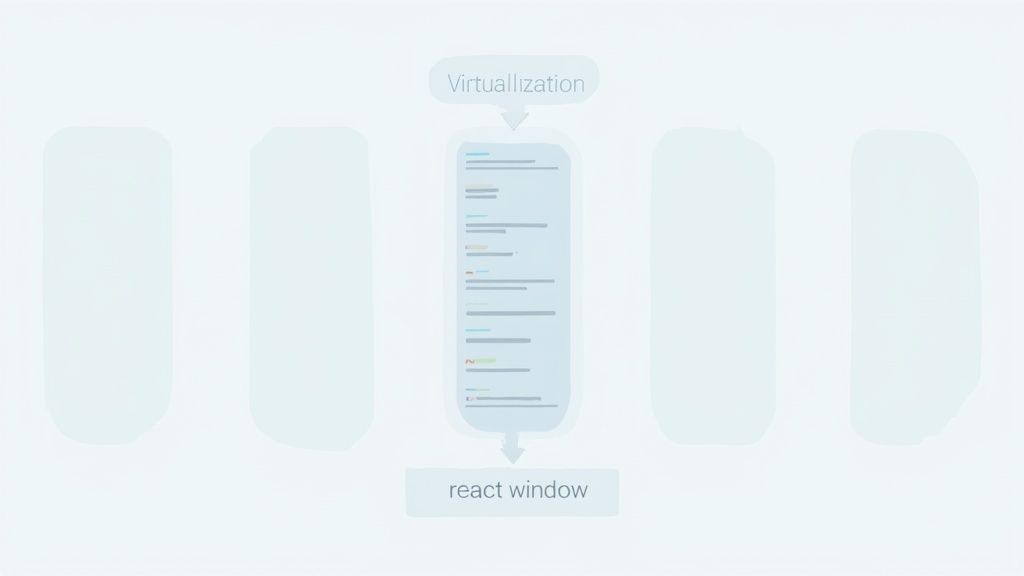
So, what's the magic? Instead of naively rendering every single item, virtualization only renders the items currently visible in the user's viewport, plus a small buffer on either side. As the user scrolls, items that move out of view are unmounted from the DOM, and new ones are mounted just as they're needed. This keeps the DOM incredibly light, whether your list has 100 items or 100,000.
Integrating a Virtualization Library
Let's be real: for most projects, building a virtualization engine from scratch is a massive undertaking. Why reinvent the wheel when battle-tested libraries like react-window and react-virtualized have already perfected it? Between the two, react-window is the lighter, more modern successor, making it the go-to choice for new projects.
Integrating one of these libraries is less about rewriting your logic and more about wrapping it. Here’s the gist of how it works:
- Wrap your list: You’ll use a component like
<FixedSizeList>fromreact-window. - Provide dimensions: This component needs to know the total item count, the height of the list container, and the height of each individual item.
- Render with a function: Instead of a simple
.map(), you pass a function thatreact-windowcalls to render each visible item. It hands you theindexand a crucialstyleprop.
That style prop is where the magic happens. It contains the exact top, left, width, and height values calculated by the library to position each item absolutely inside the scrollable container.
By handing off the rendering logic to a virtualization library, you're essentially telling React, "Forget about rendering all 10,000 items. Just render the handful I need right now, and put them exactly where they need to be."
Handling Dynamic Heights and Fetching Data
Of course, not all lists are made of perfectly uniform items. What if their heights are dynamic? This is a common curveball. For this, react-window offers <VariableSizeList>, where you provide a function to estimate each item's size. For even more complex, dynamic layouts, react-virtualized steps in with heavier but more powerful tools like <AutoSizer> and <CellMeasurer>.
Combining virtualization with your infinite scroll logic is the ultimate performance power-up. You stick with your existing data-fetching strategy (whether it’s useInfiniteQuery or an Intersection Observer) to load data in chunks. Then, you just feed that growing dataset into your virtualized component. The outcome is a UI that can juggle massive amounts of data while feeling buttery smooth.
While virtualization solves a huge piece of the puzzle, it's just one part of a broader performance strategy. It's always a good idea to brush up on general website speed optimization techniques. For a deeper dive, our guide on how to improve website performance offers a more complete picture.
Navigating Common Pitfalls and Best Practices
Putting infinite scroll into a React app is more than just tacking on new data at the bottom of a list. The real magic—and what makes for a great user experience—is in sweating the small details and dodging the common frustrations that can trip up users. Nailing these best practices is what separates a seamless, invisible feature from a clunky, annoying one.

One of the most infamous problems is the "footer trap." We've all been there: you're trying to get to the contact link or sitemap, but new content loads so fast that the footer keeps getting pushed just out of reach. It’s like a digital game of whack-a-mole, and it's a usability nightmare. You can find more great insights on this topic from DesignStudioUIUX.
An easy fix is to go for a hybrid approach. Let the feed auto-load a few "pages" of content, then stop. From that point on, show a simple "Load More" button. This hands control back to the user, letting them either keep exploring or finally reach that elusive footer without a fight.
Prioritizing Accessibility
If you're not careful, an infinite feed can become a black hole for anyone using assistive tech. When new items just appear on the screen, a screen reader has no idea they've arrived. To the user, it just seems like they've hit the end of the page.
To make your infinite scroll React component truly accessible, you need to focus on two things: announcing changes and managing focus.
- Announce New Content: This is a big one. Use an
aria-liveregion to tell screen reader users that new items have loaded. A simple, visually-hiddendivwitharia-live="polite"that says something like, "10 new items loaded" makes a world of difference. - Maintain Logical Focus: Don't let the user's focus get yanked back to the top of the page when new content appears. Their focus should either stay on the last item they were on or flow naturally into the newly loaded content.
- Provide Skip Links: For really long feeds, a "skip to footer" link near the top of the list is a fantastic accessibility aid. It’s a direct escape hatch from the content loop.
Making Infinite Scroll SEO-Friendly
Historically, search engine crawlers and JavaScript-driven content haven't been the best of friends. If Googlebot can't "scroll" to trigger your API calls, all that amazing content you're loading dynamically might as well be invisible. That's a huge problem for SEO.
A common misconception is that infinite scroll is inherently bad for SEO. The truth is, it just requires a more deliberate implementation. You can get the user experience benefits without sacrificing crawlability.
The key is to implement a fallback that search engines can actually understand. Make sure your infinite scroll gracefully degrades to classic pagination. You can do this by setting up distinct URLs for each "page" of content (like example.com/products?page=2) that crawlers can follow. This way, Google can discover and index every single item, while your human visitors still get that smooth, uninterrupted scrolling experience.
Common Questions (and Fixes) for Infinite Scroll
When you're building infinite scroll in React, a few common roadblocks tend to pop up. Nail these details, and you'll end up with a much more robust and user-friendly experience. Let's walk through the problems you're most likely to hit and how to solve them.
How Do I Handle Users Scrolling Back to the Top?
Good news: when a user scrolls back up, you don’t usually need special logic. All that data you fetched should still be sitting in your component's state, ready to be displayed.
The real challenge here is performance, especially with super long lists. This is where virtualization libraries like react-window are a lifesaver. They cleverly "unmount" items that scroll out of view, which keeps the DOM lightweight and your app feeling snappy.
And if you need to remember the exact scroll position after a user navigates away and then comes back? Just save window.scrollY to state or even local storage. When the component mounts again, you can use that value to restore their position instantly.
What Is the Best Way to Manage State?
For a simple list, you don't need to overcomplicate things. React's own useState or useReducer hooks are perfectly capable of managing your items, page count, and loading status. They get the job done without adding any external dependencies.
But what about more complex apps? When you start needing features like caching, request deduplication, and optimistic updates, a dedicated server-state library is the way to go. TanStack Query is the gold standard here. Its useInfiniteQuery hook abstracts away a ton of complexity, making your component code cleaner and far more resilient.
Choosing the right state management tool is about matching its power to your project's scale. This way, you avoid under-engineering a simple feature or, just as bad, over-engineering a complex one.
How Can I Prevent Duplicate API Calls on Fast Scrolls?
This is a classic problem, but the fix is surprisingly simple: use a loading state as a guard. Before you fire off a new fetch, just check if one is already in progress.
It looks something like this: if (isLoading) return;.
Right before you make the API call, set your loading state to true. Once the fetch completes—whether it succeeds or fails—set it back to false. This little boolean flag acts as a lock, ensuring you only ever have one data request flying at a time. No more redundant network calls, and your UI state stays clean and predictable.
Ready to build stunning, high-performance web interfaces with ease? Magic UI offers a massive library of over 150 free, open-source animated components and premium templates built with React, Typescript, and Tailwind CSS. Start creating beautiful landing pages in minutes at https://magicui.design.